💡 My Backup Plan if Dex CRM Goes Kaput
I haven’t used Dex in a couple years at this point, although I still have the account. I found I wasn’t really using Dex to record notes on interactions or what I talked about with people. I still like the idea of being able to quickly find all the people who match a concept, e.g. find all my friends who like churning credit cards, or who would find this article about software dev interesting. Also it would be nice to be able to have a baseline of info we’ve talked about in the past so i don’t have to rehash the same conversations about where people work, what their hobbies are, etc. This is mainly useful for people I see less than every 6 months, whether they are long-term friend far away or acquaintance.
What do i use for now then?
- Fossify Contacts with some backup scripts to maintain key info like address, birthday
- Google Keep Note as a crappy way to trap recommendations from people so i can remember to tell them what I thought of the book/movie/article/etc.
- No solution for keeping track of what context is relevant for people other than my lossy brain
I like using Dex as my personal CRM - their workflows are fast, intuitive, and their support team responds really quickly if you need help. That said, nothing is guaranteed in life, so if anything ever happens to their company, I don’t want to lose all my contact information along with it. We need a Super Backup Plan™️.
My Backup Plan for Dex CRM
Dex is kind enough to make exporting your contacts data super easy, so we don’t have to do any crazy scraping hullabaloo to get what we need. My plan is real simple (harder to mess up that way!):
- Export my data from Dex
- Login to Dex, then go to the Settings->Export page . Download both of the files available.
- Upload the two CSVs (Notes & Contacts) into Nocodb/Airtable
Both Airtable and Nocodb (self-hostable, open-source Airtable alternative) have options that let you import a CSV file as a new Table.
On import it will ask you to choose the different field types to match Nocodb/Airtable types - ones I’ve already figured out and you can copy are: Contacts
GroupMembership - should be multi-select, their delimiter is ` ::: `. There are also individual columns, Group1, Group2,...etc.
LastSeenAt - DateTime
LastReminderAt - DateTime
NextReminderAt - DateTime
Notes
EventTime - DateTime
Caveats & Notes
- Contact photos are on a CDN - you’ll need to come up with an alternative place to host/save them, if that’s worth your effort.
- Attempting to tie the
Notestable with theContacts- Looks like the
Link to Another Recordone-to-many is a good fit for a column tieing the two tables together, but have not figured out yet how to run them all automatically.
- Looks like the
Final Result
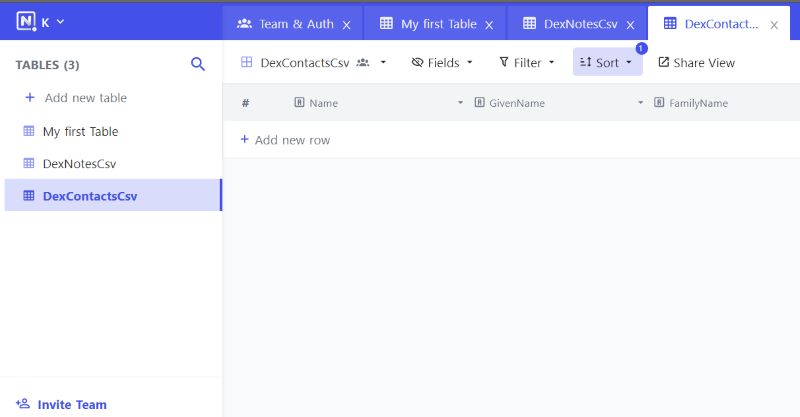
Both of the new tables thriving in my self-hosted NocoDB instance - this is just a Proof of Concept to make sure the idea works, so not worried about reliability for now.
Another Alternative
If I had no desire for a web based tool, there’s always loading the data into a SQLite DB - then I can query whatever my heart desires against it. I don’t have any complex needs other than easy access for editing (otherwise I won’t keep it up to date!) so this is more of a “if the mood strikes me” idea.
Personal CRMs: why/how
- Reddit post does decent explanation of the benefit/why
- Nat Eliason runs his in Airtable for simplicity
- An example of a person who has configured Airtable to act as a quasi-Dex with reminders to reach out . I’ll just use Dex for now and keep this as a backup plan.